When a buyer wants a specific used car today, their journey almost always starts the same way: a search on Google. For years, the first results they saw were the big marketplaces. Google Vehicle Ads change that by putting your actual stock, with a photo, price and mileage, directly in the search results before the buyer ever clicks through to a third-party site.
I have watched this shift closely while building Vehiso, and for independent dealers it is one of the more important developments in online car advertising in years. This guide explains what Google Vehicle Ads are, why they matter for your dealership, and exactly how to get set up.
What are Google Vehicle Ads?
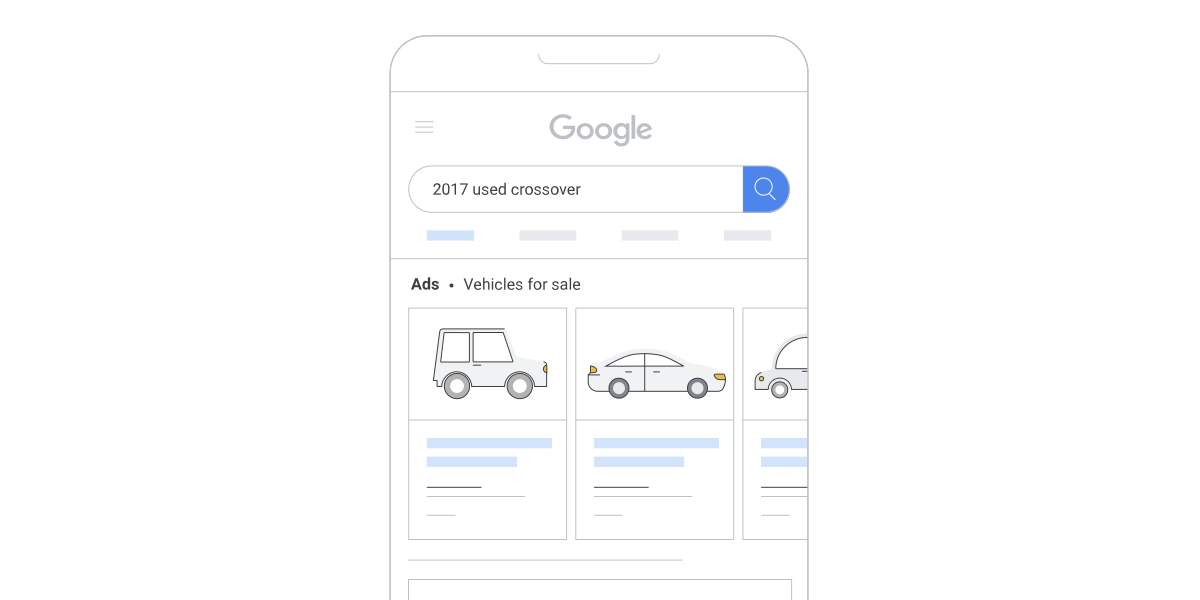
Google Vehicle Ads are a type of paid search ad that shows individual vehicles from your stock directly in Google search results. They work in a similar way to the Shopping ads you have probably seen for retail products, but they are built specifically for cars.
When someone searches an intent-led phrase like "Audi A3 for sale near me" or "used Ford Kuga Manchester", Google can show a carousel of matching vehicles. Each one includes a photo, the price, the mileage and the dealership name. The buyer sees real cars they can actually buy, from real dealers, right at the top of the page.
The important part is that these ads pull from a feed of your live stock. The vehicles shown are yours, priced as you have them, and they update automatically as your inventory changes. A car that sells comes down; a car you add appears.
Where the ads appear
Google Vehicle Ads can surface in several places:
- Google Search - the vehicle carousel that sits above or near the top of relevant results
- Google Maps and your Business Profile - linking the vehicle back to your physical dealership, complete with reviews and directions
- Across Google's wider network when the ads run through a Performance Max campaign, which distributes them automatically to wherever they are most likely to convert
Why Google Vehicle Ads matter for your dealership
You reach buyers at the very start of their search
A huge number of car buyers begin with a Google search rather than going straight to a marketplace. Historically, the first thing they saw was a list of links to the big classified sites, and your stock was buried somewhere inside those. Vehicle Ads move the first opportunity to be seen right to the top of that initial search, so your cars can appear before the buyer has even decided which marketplace to browse.
The leads are more qualified
Because a buyer clicks a Vehicle Ad after searching for a specific make, model or body type, the traffic you get is already interested in the kind of car you are advertising. Someone who taps through to a Vauxhall Corsa listing has told Google exactly what they want. That tends to convert better than broad, untargeted traffic.
It works alongside your other channels
Vehicle Ads are not a replacement for your website or your marketplace listings. They are another shop window, optimised for both online conversions (enquiries and finance applications) and offline conversions (calls and visits to your forecourt). Used together with a strong car dealer website, they widen the top of your funnel.
It connects to your Google Business Profile
Vehicle Ads link to your Google Business Profile, so a buyer who sees your car can immediately see your reviews, opening hours, contact details and directions. That is a powerful trust signal and a direct route to more calls and footfall. If you have not claimed and optimised your Business Profile yet, do that first.
It reduces your reliance on marketplaces
For the past decade, online car advertising in the UK has been dominated by a small number of marketplaces, and their fees only go one way. Google stepping into this space gives dealers another route to buyers and, over time, can reduce how dependent your business is on any single platform.
What you need before you start
To run Google Vehicle Ads you need a few things in place:
- A Google Merchant Center account (this is where your vehicle feed lives)
- A Google Ads account (this is where you set budgets and run the campaign)
- A verified Google Business Profile for each dealership location
- A dealer website with a live vehicle stock feed that meets Google's policies, including clear pricing and vehicle detail pages for each car
That last point matters. Google needs to crawl proper vehicle pages with structured data, so a fast, well-built website with clean listings makes the whole process far smoother. Our guide to the must-have features for a car dealer website covers what good listings look like.
How to set up Google Vehicle Ads, step by step
- Create a Google Merchant Center account and a Google Ads account, and make sure your Google Business Profile is verified.
- Enable the Vehicle Ads programme within Merchant Center.
- Add your business information and complete the account setup.
- Create, register and submit your vehicle stock feed so Google can read your inventory.
- Link your Google Business Profile and submit your location group so ads tie back to your forecourt.
- Complete Google's website policy review, which checks that your site meets their requirements.
- Set up a Performance Max campaign in Google Ads, set your budget, and launch.
Once live, monitor your campaign in Google Ads and keep your feed healthy. Disapproved vehicles are usually caused by missing data or pricing mismatches between your feed and your website, which is why an accurate, automated feed makes such a difference.
How Vehiso helps you list on Google Vehicle Ads
The trickiest part of Vehicle Ads for most dealers is the feed. Building and maintaining an accurate feed by hand is exactly the kind of admin that eats your week and goes wrong the moment a price changes.
Vehiso pushes your stock to Google Vehicle Ads directly from your dealer management system. You add and price a vehicle once, and it flows out to Google alongside your website and your other connected channels. When the car sells, it comes down everywhere automatically. No spreadsheets, no manual uploads, no out-of-date ads.
Is it free? What does it cost?
Setting up Merchant Center, a Business Profile and the vehicle feed is free. Google Vehicle Ads themselves are a paid channel, though. Like other Google Ads, you set a budget and pay based on clicks and campaign performance, so the running cost depends on how competitive your market is and how much you choose to spend. The feed and the setup cost nothing; the advertising is where the spend sits.
Frequently asked questions
Do I need my own website to run Google Vehicle Ads?
Yes. Google needs to send buyers to vehicle detail pages on a website that meets its policies, with clear pricing and proper structured data. Marketplace listings alone are not enough, which is another reason having your own dealer website matters.
How is this different from marketplace advertising?
Marketplaces put your car on their platform. Google Vehicle Ads put your car directly into Google search results and send the buyer to your own website. You reach buyers earlier and keep them in your own funnel rather than a third party's.
How quickly will my vehicles show up?
Once your feed is submitted and your account passes Google's policy review, vehicles typically start appearing within a few days, assuming the listings are complete and compliant. A clean, automated feed speeds this up because there are fewer errors to resolve.
Can I run Vehicle Ads for more than one location?
Yes. You submit a location group linked to your Google Business Profiles, so multi-site dealers can advertise stock across each of their forecourts.